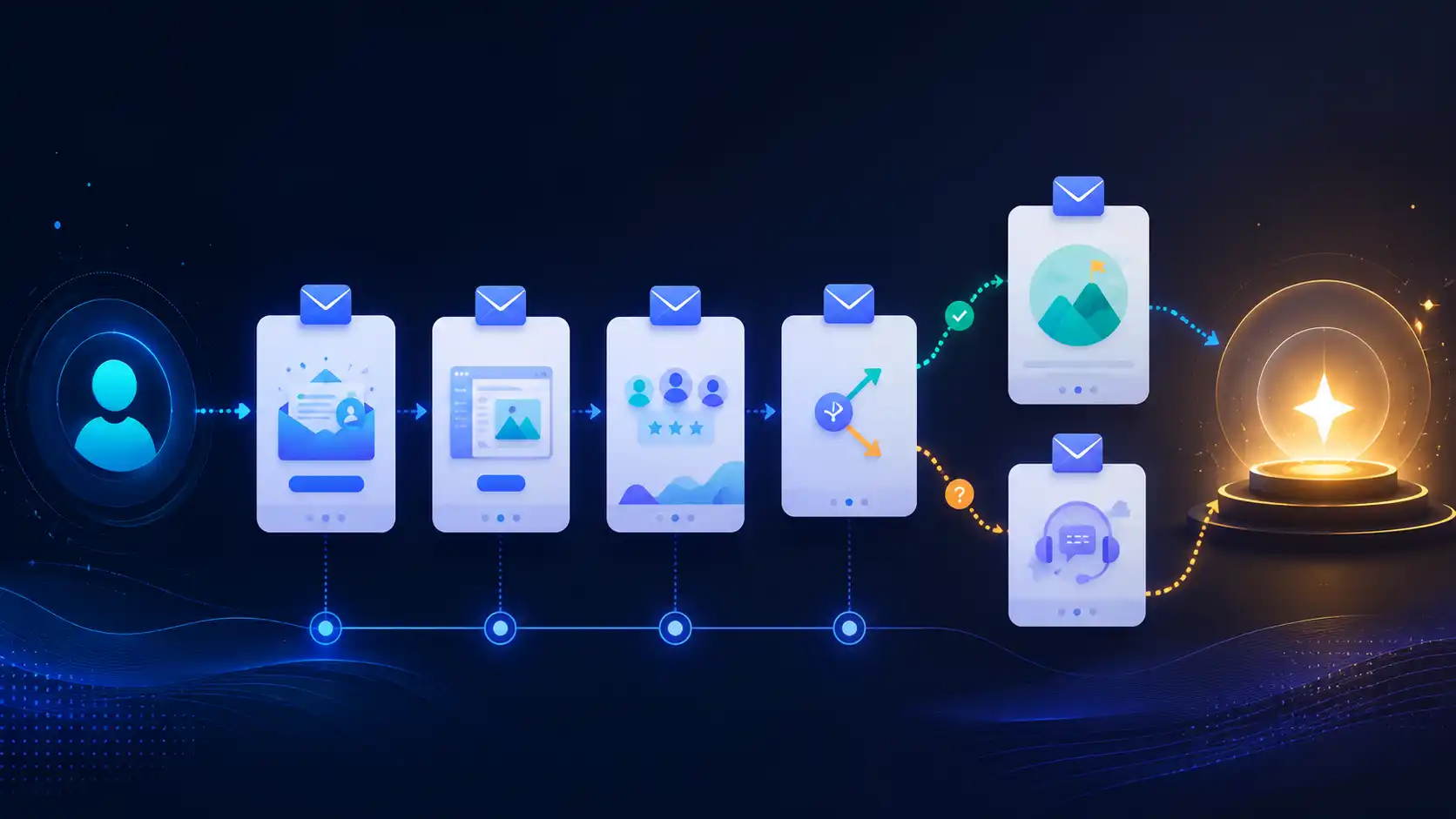
A SaaS onboarding email sequence is a series of automated emails sent to new signups with one specific goal: get the user to their activation milestone, the moment they first experience the product’s core value. Not just “welcome them.” Not “show every feature.” Drive them to the aha moment that makes cancellation feel like a loss.
Intercom describes what you’re working against: “The SaaS law of averages suggests 40-60% of people who sign up for a free trial of your software will use it once and never come back.” The onboarding sequence is your main lever to pull that number down.
This post covers the structure, timing, and examples for the onboarding phase specifically. For the full lifecycle (adoption, win-back, expansion), see SaaS lifecycle email sequences. For how onboarding fits alongside your other automated workflows, see the email automation for SaaS hub.
What “activation” means and why it sets the goal
Activation is when a user completes the action that correlates with long-term retention, your product’s specific “aha moment.” For a project management tool it might be creating a project and inviting a teammate. For a reporting tool it might be connecting a data source and generating one chart.
Userpilot’s 2024 benchmark report, drawing on data from 62 B2B SaaS companies, found that the average activation rate is 37.5%. That means most products lose more than six out of ten signups before they reach the moment that creates a retained user.
Your onboarding sequence exists to close that gap. Every email should remove a barrier between signup and the activation milestone, not sell features, not build brand awareness.
Before writing a single email, define your activation event in concrete terms: the specific action (or set of actions) that signals a user has seen value. Without it, you cannot measure whether the sequence is working.
Time-based vs. behavior-triggered onboarding
Most onboarding sequences start time-based: Email 1 at signup, Email 2 on Day 2, Email 3 on Day 5. That model is easy to build and works adequately for simple products with a short time-to-value.
Behavior-triggered sequences adapt to what each user has (and has not) done. A user who created a project on Day 1 should not receive the same Day 2 email as one who has never logged back in. The trigger and the message should match the user’s current state.
The practical difference: a time-based sequence treats all users identically after signup. A behavior-triggered sequence branches based on completion of your activation steps.
For most SaaS products, the right architecture combines both: a short time-based runway at the start (to catch users before they go cold), then branches based on whether the user has hit key checkpoints. If they completed step A, skip the reminder and move to step B. If they have not, send the nudge.
The 5-email onboarding sequence: structure, timing, and triggers
The table below shows a practical framework for a SaaS product with a 14-day free trial. Adjust email count and timing to match your product’s time-to-value. Simple tools may need 3 to 4 emails; complex enterprise products sometimes extend to 30 days.
| # | Timing / Trigger | Goal | Trigger Logic |
|---|---|---|---|
| 1 | Immediately on signup | Welcome + single next step | Always send; no branching |
| 2 | Day 1 or first login event | Drive the first core action | Send if user has NOT completed Step 1 |
| 3 | Day 3 | Use case / social proof | Send if user has NOT hit activation milestone |
| 4 | Day 7 | Activation nudge or help offer | Branch: if activated, advance to adoption; if not, escalate support |
| 5 | Day 12 (2 days before trial end) | Trial conversion or plan choice | Send regardless of activation state; tailor copy per activation status |
Email 1: Welcome + single next step (immediate)
Trigger: Signup confirmed
Goal: Get the user to take one action right now
The welcome email has the highest open rate of any email in the sequence. According to GetResponse’s benchmark data, welcome emails average an 83.63% open rate and a 16.60% click-through rate, far above standard campaign averages. Don’t waste that attention.
The failure mode here is listing everything the product can do. Instead, name one action. Make it the smallest possible step toward the activation milestone.
Subject: Your [Product] account is ready. Start here.
Hi [First name],
Your account is set up. The fastest way to see what [Product] can do is to [single specific action, e.g., “connect your first data source”].
It takes about 3 minutes.
[CTA: Connect now]
If you have questions, reply to this email or check the [Getting Started guide].
[Name], [Product] team
Keep it under 120 words. One link.
Email 2: Core action nudge (Day 1 or after first login)
Trigger: User has not completed the first activation step
Goal: Remove the most common friction point
This email should be sent only if the user has not yet completed Step 1. If they have, skip to Email 3 or send a different message that advances them to Step 2.
Identify the single most common place users stall and address it directly: a common error, a missing prerequisite, or just the fact that the step looks harder than it is.
Subject: Still setting up? Here’s where most people get stuck.
Hi [First name],
Most new [Product] users get a bit stuck on [specific step]. Here’s the short version of how to get past it: [2-sentence explanation or link to specific doc].
[CTA: Complete setup]
Takes less than 5 minutes once you know that part.
Concrete, specific to the stall point. Not a generic “need help?” message.
Email 3: Use case + social proof (Day 3)
Trigger: User has not yet reached the activation milestone
Goal: Rebuild motivation with a concrete outcome
By Day 3, users who have not activated are drifting. Generic feature tours won’t help. A specific use case story, with a concrete outcome, can re-anchor their attention on the problem they signed up to solve.
Subject: How [Company type] teams use [Product] to [specific outcome]
Hi [First name],
One of our customers, [Name] at [Company], was dealing with [relatable problem]. After [specific action in product], they [concrete result].
If your goal is [similar outcome], here’s the exact path they took: [link to case study or doc]
[CTA: Try this in your account]
A real customer story, with a named outcome, works better than a list of testimonials. Keep it to one story.
Email 4: Activation check-in or stuck-user branch (Day 7)
Trigger: Split on activation status
Goal: Advance activated users; rescue stuck users
This is the most important branch in the sequence.
If activated: Congratulate the user briefly, then point to the next level of value. This is the handoff to an adoption sequence. Link to SaaS lifecycle email sequences for the full model.
If not activated: Change the approach. Instead of another nudge, offer a concrete help option: a short call, a live demo, or a direct reply to this email with their question.
Subject (not activated): Still getting started? We can help directly.
Hi [First name],
If you haven’t had a chance to get [Product] running yet, I want to make sure it’s not because of something we can fix quickly.
Reply to this email with what you’re trying to do, or [book a 15-minute setup call here].
Happy to help.
[Name]
Make this one feel human. Sending from a real name, not “The [Product] Team,” tends to lift response rates on this type of email.
Email 5: Trial nudge (Day 12)
Trigger: Trial ending in 2 days
Goal: Convert activated users; re-engage stuck ones
Use activation status to personalize this email, not to the level of full dynamic content, but at least two versions: one for users who have activated, one for those who have not.
Activated version: Remind them what they have built or set up. Make the upgrade path feel low-friction.
Not-activated version: Acknowledge they did not get to experience the product fully. Offer a trial extension or a migration path. Losing a user who wanted to succeed but ran out of time is preventable.
Subject (activated): Your trial ends in 2 days. Here’s what you’ve set up.
Hi [First name],
In the last [X days] you’ve [list of completed actions, e.g., “connected 2 data sources and generated 4 reports”]. Paid plans start at [price] and include [key feature they’ve used].
[CTA: Upgrade now]
What to measure
Sequence performance comes down to two metrics:
Activation rate is the percentage of signups who reach your defined activation milestone within the trial window. This is the primary success metric for the sequence. Userpilot’s 2024 benchmark places the SaaS average at 37.5%. A well-run sequence should push your rate above that baseline.
Time-to-value measures how many days elapse between signup and activation. Shortening this number is the signal that your emails are removing real friction, not just generating opens.
Secondary metrics worth tracking per email: open rate (for subject line quality), click-through rate (for message relevance), and reply rate on the Day 7 stuck-user email (a proxy for real engagement with a struggling user).
Open rates have become less reliable as a standalone metric since email clients began auto-loading images. ChartMogul’s SaaS Conversion Report found that the median free-to-paid conversion rate across all products is 8%, providing a useful downstream benchmark: a well-tuned onboarding sequence should move that number up meaningfully.
Common mistakes
Too many emails, too fast. Sending five emails in the first 48 hours trains users to filter you. Space emails based on behavior, not an aggressive calendar.
Feature-dump emails. “Here are 12 things you can do in [Product]” is not an onboarding email. It is a newsletter. Pick one action per email.
No branching on activation. Sending the same Day 7 email to a power user and an account that has never logged in is a missed opportunity at best and an annoyance at worst.
Skipping deliverability hygiene. Onboarding emails land in the primary inbox most of the time because they are triggered and relevant, but authentication (SPF, DKIM, DMARC) and a clean sender reputation are still the foundation. If your emails are not reaching inboxes, the sequence cannot do its job. See why emails go to spam for a practical checklist.
Measuring opens instead of activation. A 60% open rate that produces a 10% activation rate is a copywriting problem, not a success. Always trace the sequence back to the activation event.
Building and iterating the sequence
If you are using an automation platform that supports event-based triggers (most do: Customer.io, Brevo, and others), wire each email to user events from your app, not just calendar offsets. The minimal setup is: (1) signup event fires Email 1 immediately; (2) a daily check fires conditional emails based on whether the activation milestone event has been logged.
Cold Letter’s automation builder supports this event-trigger model if you want a single platform for transactional and lifecycle email.
Start simple: build the 5-email time-based version first, verify your activation events are tracked correctly, then layer in behavioral branching at Email 2 and Email 4. Trying to build full behavioral branching before you have reliable event tracking produces a sequence that is hard to debug and harder to iterate.
For the broader email strategy that situates onboarding within the full growth loop, email marketing for SaaS growth covers the strategic layer.
Frequently asked questions
What is an onboarding email sequence?
An onboarding email sequence is a series of automated emails sent to new signups with the goal of driving them to a defined activation milestone, the point at which they have experienced the core value of the product. It typically runs for the length of a free trial and branches based on user behavior.
How many emails should a SaaS onboarding sequence have?
Most SaaS products use 4 to 7 emails spread over 14 to 30 days, depending on the product’s time-to-value. Simple tools with a short path to activation can get by with 3 to 4. Enterprise products with longer learning curves sometimes extend to 10 or more over 30 days. The right number is the fewest emails needed to move a user through every barrier between signup and activation.
What is the difference between a welcome email and an onboarding sequence?
A welcome email is the first message after signup, confirming the account and giving one next step. An onboarding sequence is the full series of emails designed to guide a user through the activation journey. The welcome email is Email 1 in the sequence; the sequence does not end there.
Should onboarding emails be time-based or behavior-triggered?
Both approaches have a place. Time-based emails are simpler to build and work well for the opening window. Behavior-triggered emails, sent based on whether a user has completed a specific action or stalled at a specific step, are more relevant and produce better activation outcomes. The practical recommendation is to start with a time-based sequence, instrument your activation events in the app, and then add behavioral branching at the key decision points.
How do I know if my onboarding email sequence is working?
The primary metric is your activation rate, the percentage of new signups who reach your defined activation milestone within the trial window. Track time-to-value alongside it. Secondary signals include click-through rates per email (to identify which steps users skip) and reply rates on help-offer emails (to gauge how many users are genuinely stuck). Open rates alone are not sufficient.
What is the activation milestone in SaaS?
The activation milestone is the specific in-product action (or sequence of actions) that correlates with long-term retention for your product. Examples: creating and publishing a first project, connecting a data source and running one report, or inviting a teammate and completing a shared task. Each product’s milestone is different. It should be identified through cohort analysis comparing retained users against churned users in the first 30 days.
How long should a SaaS onboarding email sequence run?
The sequence should cover the full length of the free trial and end at the trial conversion decision point. For a 14-day trial, the sequence runs 14 days. For a 30-day trial, extend to 30 days. Some teams run a short post-trial sequence for users who converted, to solidify activation in the paid phase, but that belongs to an adoption or onboarding-to-retained sequence rather than the trial onboarding sequence.
Sources
- Intercom, “Learn how to nurture new signups beyond the free trial”
- GetResponse, “Email Marketing Benchmarks”
- Userpilot, “User Activation Rate Benchmark Report 2024”
- ChartMogul, “The SaaS Conversion Report”

I’ve spent my career building software at scale with a soft spot for email: deliverability, lifecycle campaigns, and getting messages to actually land. I started Coldletter to fix what bugged me about transactional and marketing email tools. I’m based in Vancouver.