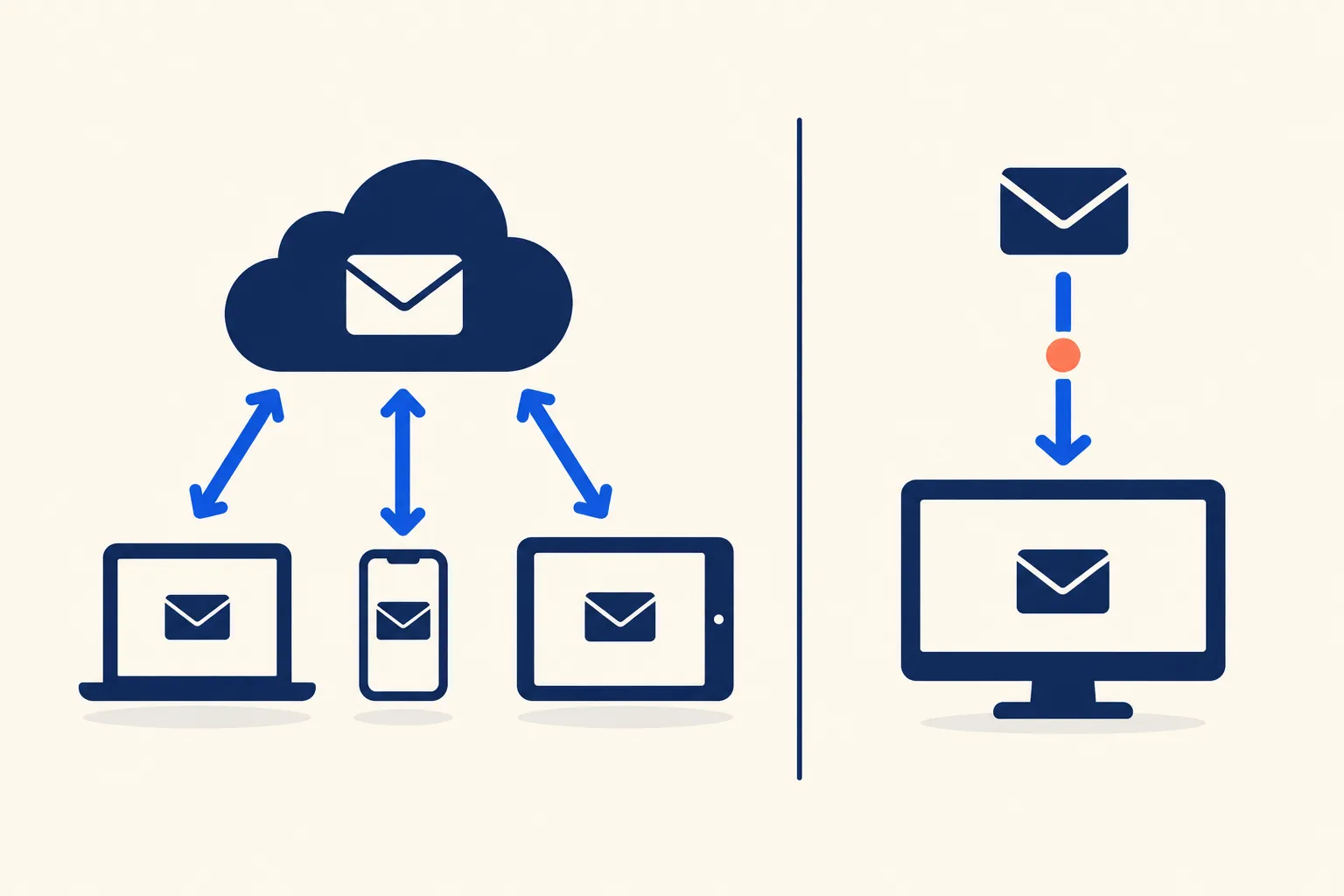
IMAP leaves your mail on the server and keeps read state and folders in sync across every device. POP3 downloads mail to a single client and, by default, removes it from the server. SMTP is a different job: it sends mail, while IMAP and POP3 only read it. For almost everyone, IMAP is the right choice. POP3 is worth picking only in a few narrow cases, covered below.
If you landed here searching “IMAP vs SMTP”, the short version is that they are not alternatives. A mail client uses SMTP to send and IMAP (or POP3) to receive, so a normal account setup needs both.
IMAP vs POP3 at a glance
| IMAP | POP3 | |
|---|---|---|
| Where mail lives | On the server; clients show and cache it | Downloaded to the client; by default deleted from the server |
| Multiple devices | Designed for it; all clients see the same mailbox | Awkward; each device downloads its own copy |
| Folders and flags | Server-side folders and flags such as \Seen and \Deleted | One maildrop, no folder sync |
| Server-side search | Yes (SEARCH command) | No search command in the protocol |
| Fetching before downloading | Can list senders and subjects before pulling full messages | Downloads whole messages |
| Server storage use | Grows, because mail stays on the server | Shrinks after download unless you keep copies |
| Near-real-time updates | Yes, with IDLE (RFC 2177) | No push; the client polls |
| Default ports | 143 (cleartext port), 993 (implicit TLS) | 110 (cleartext port), 995 (implicit TLS) |
| Current specification | IMAP4rev2, RFC 9051 (replaces IMAP4rev1, RFC 3501) | POP3, RFC 1939 (STD 53) |
Sources for the table: RFC 9051, RFC 3501, RFC 1939, RFC 8314, and Microsoft’s POP3 and IMAP4 in Exchange Online.
Use port 993 or 995 when you can. RFC 8314 says that “this specification now recommends the use of Implicit TLS for POP, IMAP, SMTP Submission, and all other protocols”, which means the TLS handshake starts as soon as the connection opens, rather than upgrading a cleartext session with STARTTLS.
How IMAP works: the server stays the source of truth
RFC 9051 opens with the core idea: IMAP “allows a client to access and manipulate electronic mail messages on a server.” Your mail client connects, authenticates, selects a mailbox such as INBOX, and then reads or changes messages in place. Marking a message read, moving it to a folder, or deleting it is a command sent to the server, so every other client sees the change the next time it syncs.
That is why the same inbox looks identical on your phone, laptop and webmail. It also means the server holds your only complete copy, so its storage quota matters.
How POP3 works: download, then usually delete
RFC 1939 is blunt about the intent: “POP3 is not intended to provide extensive manipulation operations of mail on the server; normally, mail is downloaded and then deleted.” A session lists the messages waiting in the maildrop, retrieves them, marks them for deletion, and when the client quits the server “removes all messages marked as deleted from the maildrop.”
Most clients offer a “leave a copy of messages on the server” option. Microsoft’s Exchange documentation notes that “you can typically configure a POP3 client to keep copies of downloaded messages on the server.” That fixes the disappearing-mail problem, but not the rest. Each device still downloads its own copy, read and unread state is tracked per device, and POP3 downloads to a single folder, so your folder structure does not follow you.
Where SMTP fits
IMAP and POP3 sit at the end of the journey. SMTP handles everything before it:
- Sender’s client to sending server: the client submits the message over SMTP, normally on port 587 (STARTTLS) or 465 (implicit TLS). See SMTP ports 587 and 465 for when to use which.
- Sending server to recipient’s server: the servers pass the message along over SMTP on port 25, often through an SMTP relay.
- Recipient’s server to recipient’s client: the message waits in the mailbox until the recipient’s client fetches it over IMAP or POP3.
If you want the sending side in detail, start with what SMTP is. Microsoft’s docs put the split in one sentence: “Email programs that use POP3 and IMAP4 rely on SMTP to send messages.” That is also why an email client asks for two servers, an incoming one (IMAP or POP3) and an outgoing one (SMTP). For example, Exchange Online uses Outlook.office365.com on port 993 for IMAP and Smtp.office365.com on port 587 for SMTP. For the Gmail equivalents, see Gmail SMTP settings.
When POP3 still makes sense
POP3 is a niche choice now, but it fits a few situations:
- A single-device archive. One machine downloads everything and keeps the only copy, for example an old mailbox you want on local disk.
- Tiny server quotas. If your host gives you a few hundred megabytes, downloading and deleting keeps the mailbox from filling up.
- Offline-first or air-gapped workflows. A machine that connects briefly and works from a local store.
- Local retention requirements. Some setups want mail pulled off the provider and stored on hardware you control.
The costs are real. If the device dies and there is no backup, the mail is gone, because the server copy was deleted. Two devices on one POP3 account will split your mail between them.
One provider change matters if you rely on POP fetching. Google’s support page states that for Gmail’s Gmailify and “Check mail from other accounts” (the POP-based feature), “After the first quarter of 2026, this feature no longer supports new users. Existing users can still use the feature until January 2027.” Google’s suggested replacements are the Gmail mobile apps, which use a standard IMAP connection, or automatic forwarding from the other provider. Details are on Google’s Gmail Help page.
Beyond IMAP and POP3: Exchange and JMAP
Microsoft 365. POP3 and IMAP4 are enabled by default in Exchange Online, but they “provide access to the basic email features” and “don’t offer rich email, calendaring, and contact management” that come with Outlook, Exchange ActiveSync or Outlook on the web. Microsoft also warns that disabling Basic authentication “will block legacy protocols, such as POP and IMAP,” so plain-password IMAP may simply stop working on tenants that enforce modern authentication. Developers who want programmatic mailbox access there use the Outlook mail API in Microsoft Graph instead of IMAP.
JMAP. RFC 8620 defines a protocol “to efficiently query, fetch, and modify JSON-based data objects, with support for push notification of changes and fast resynchronisation.” RFC 8621 applies it to email, describing “a data model for synchronising email data with a server.” It runs over HTTP and JSON, and Fastmail is one of its named implementers, according to jmap.io. Support in clients and hosts is still far narrower than IMAP, so treat it as something to watch, not a default.
Reading mail programmatically: IDLE, polling and webhooks
If your code needs to react to incoming mail, the protocols behave differently.
- IMAP IDLE. Plain IMAP makes a client poll for changes. RFC 2177 exists because “it’s often more desirable to have the server transmit updates to the client in real time.” While IDLE is active, the server can send
EXISTSandEXPUNGEnotifications at any time. RFC 2177 also advises clients to “terminate the IDLE and re-issue it at least every 29 minutes to avoid being logged off,” so your worker needs a renewal loop and reconnect handling. - POP3 polling. POP3 has no push. You connect on an interval, list messages, retrieve and delete them. Simple, but latency equals your polling interval, and your code must track what it has already processed, because a crash before the session ends can leave messages on the server to be fetched again.
- Inbound-parse webhooks. If you only need to process replies, bounces or a dedicated support address, pointing that address at a provider that POSTs each parsed message to an HTTPS endpoint is usually less work than running your own IMAP poller with reconnects and credential storage. IMAP fits better when you must read an existing human mailbox you do not control. For the outbound half, see sending email through an API, and for delivery events, email webhooks.
How to switch from POP3 to IMAP without losing mail
Mail your POP3 client already downloaded and deleted from the server will not reappear on the server by itself. Move it yourself:
- Stop deletion first. In your POP3 client, turn on “leave a copy of messages on the server” so nothing else is removed.
- Back up the local mail. Copy the client’s profile or export the mailbox before touching anything.
- Add the account again using IMAP. Use your provider’s IMAP host on port 993 with SSL/TLS, and keep the SMTP settings for sending.
- Let the folders sync. Wait until the server’s mail has finished downloading into the new IMAP account.
- Upload the old local mail. Drag the messages from the old POP3 local folders into a folder in the IMAP account. The client uploads them to the server, so they now sync everywhere. Check your quota first.
- Verify, then remove the POP3 account. Open the mail on a second device before deleting the old configuration.
Frequently Asked Questions
Is POP3 still used in 2026?
Yes, but rarely as a first choice. Providers such as Exchange Online still support it, and it suits single-device archiving. Microsoft is steering Exchange Online tenants away from plain-password POP and IMAP toward modern authentication, and Gmail is retiring its POP fetch feature for other accounts, with existing users supported until January 2027.
Which is more secure, IMAP or POP3?
Neither protocol is inherently more secure. What protects the connection is TLS, and RFC 8314 recommends implicit TLS for both, on ports 993 (IMAP) and 995 (POP3). The difference is where the mail ends up: POP3 usually moves it to one device, so that device’s security and backups matter more.
Does IMAP use more server storage than POP3?
Yes. IMAP leaves messages on the server, so they count against your quota until you delete them. POP3 clients normally download and delete, which frees space, unless you enable the option to keep copies on the server.
What ports do IMAP and POP3 use?
IMAP uses 143 (the cleartext port) and 993 (implicit TLS). POP3 uses 110 and 995 (implicit TLS). Sending uses SMTP submission on 587 (STARTTLS) or 465 (implicit TLS). Prefer the implicit TLS ports.
Is SMTP the same as IMAP?
No. SMTP sends and relays mail between clients and servers. IMAP retrieves and manages mail already sitting in a mailbox. A typical email client is configured with both.
Can I use IMAP and POP3 on the same account?
Technically yes, if the provider enables both, and Exchange Online does by default. In practice it causes trouble: a POP3 client that deletes mail after download removes it from what your IMAP clients see. If you must mix them, set the POP3 client to leave copies on the server.
Does IMAP work offline?
Most IMAP clients cache messages locally, so you can read what was already synced without a connection. Changes you make offline, such as moving or deleting a message, are applied to the server the next time the client reconnects. How much is cached depends on the client’s settings.

I’ve spent my career building software at scale with a soft spot for email: deliverability, lifecycle campaigns, and getting messages to actually land. I started Coldletter to fix what bugged me about transactional and marketing email tools. I’m based in Vancouver.